Newsletters and Emails
Emails are a powerful tool to inform, engage, and build relationships with your audience. Emails can also support event promotion and registration. This section walks you through strategy, formatting, accessibility, and publishing tips to help you create emails that resonate.
Email Platform
Student Affairs recommends using Eloqua as the platform to send emails. Eloqua is a powerful marketing automation tool by Oracle. At UW–Madison, an enterprise level of Eloqua is supported by DoIT and available to all schools, colleges, divisions, and units for free.
Our central communications team supports and manages Eloqua for teams within Student Affairs. We can help you by creating branded and accessible templates, providing support office hours to help your staff create and send emails, and consulting on implementing complex marketing automation campaigns for event registration, fundraising, and more.
Contact us to get set up with Eloqua, assistance with templates, or help setting up email campaigns.
Getting started with Eloqua at Student Affairs
This section is for units that are set up with Eloqua and need to add a new user to Eloqua. If your unit is not in Eloqua yet, please skip to ‘New units and users not on Eloqua’
- Email Sarina Lotlikar when you need user(s) to be set up in Eloqua. Please provide the following.
- Full name, email address, and NETID of each user that needs to be added
- Whether the person(s) being added is a student or staff member
- If the person(s) have experience with Eloqua from a prior job on campus
- If any employees need to be deactivated
- Sarina will email each person who needs to be added with the compliance form and instructions to fill out.
- Once the form is filled out, the user(s) will get access to an Eloqua training course in Canvas.
- Complete the Canvas training course to begin using Eloqua.
This section is for new units that currently do not have any users or templates in Eloqua. If your unit is already on Eloqua please go above to ‘New users for units on Eloqua.’
- Email Sarina Lotlikar and cc your unit’s communication person when you need to set up your unit in Eloqua.
- Sarina will schedule an initial discovery meeting to discuss the following
- Your current email platform, audiences, and the kind of emails you send
- Your current process for creating and sending emails, including email lists
- Employees and student interns who will need access to send emails
- If your employees and students have used Eloqua at UW–Madison
- Other support needs such as email templates
- After the initial discovery meeting, Sarina will work to get your unit set up in Eloqua
- Contact the marketing automation team that oversees Eloqua to have your unit set up in Eloqua
- Create templates and assets needed
- You will have opportunities to share feedback and make changes
- Email all the user(s) who need access with the compliance form and instructions to fill out
- Once the form is filled out, the user(s) will get access to an Eloqua training course in Canvas.
- Complete the Canvas training course for next steps
- Once everyone has completed the compliance form & Canvas training course, the unit is set up in Eloqua, and all supporting assets are ready. Sarina will schedule a hand-off. During this meeting
- We will ensure everyone has access to Eloqua
- Show you where your assets are located and how to use them
- Answer any additional questions
Once these steps have been completed, your unit is ready to use Eloqua for emails.
Using your email template
- Navigate to the folder with your template
- Select your template – click the three dots under the actions column and then click copy
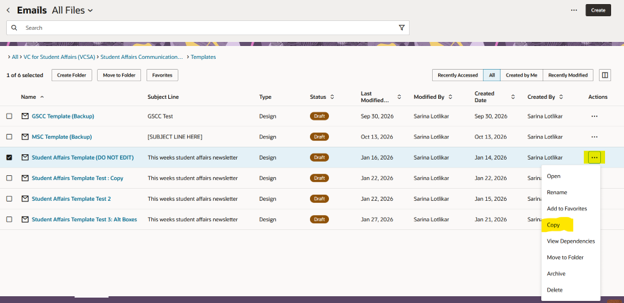
- Eloqua will duplicate the email as a copy. Select the copy – click the three dots under the actions column and click rename.
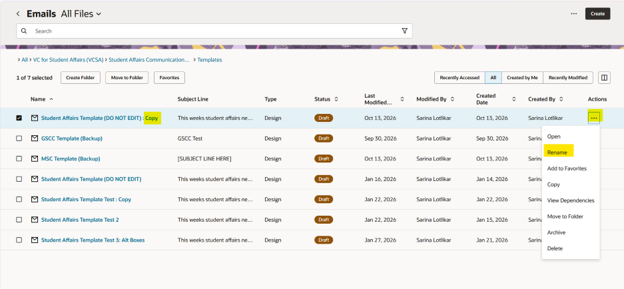
- Rename the file to a meaningful name e.g., October 2026 Student Affairs Newsletter or 10.13.26 Student Affairs newsletter
- Open the file and start creating your email
Helpful email resources
Optimizing for Engagement
Email metrics
Eloqua offers in-depth email analytics to improve and optimize your email performance. We strongly recommend using Eloqua’s analytics tools to analyze your email performance. Create a spreadsheet to log key data so you can measure your performance over time.
We will utilize the table below from Eloqua to go over email metrics that matter.
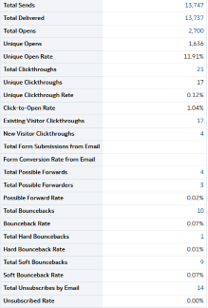
Delivery rate is the percentage of emails delivered. In the table, 13,747 emails were sent, and 13,737 were delivered. The delivery rate is 13,737/13,747 = 99.93%
You want your delivery list to be as close to 100% as possible. There are many reasons why emails aren’t delivered – the email no longer exists, your messages got filtered as spam, or the inbox is full.
You want to regularly clean your email list of emails that no longer exist and avoid spam triggers that can filter your email into spam.
Open rate is the percentage of email opens. In the table, 13,737 emails were delivered and had 1,636 unique opens. The open rate is 1,636/13,737 = 11.91% (Eloqua has calculated that for you)
Note: Unique open is how many times the email was opened by a unique email address. 1.636 people opened the email. Sometimes people may open an email multiple times. The email was opened for a total of 2,700 times, which means some people opened it two or more times. Open rate is always based on unique opens.
If your open rate is consistently below 25%, it reflects that your audience is disengaged or uninterested in your content. You may want to explore options to improve engagement, such as changing the timing or frequency of emails, segmenting your lists to personalize and tailor content, crafting compelling subject lines, writing succinct, readable copy, and conducting offline audience focus groups.
Note: Since almost 75% of audiences will not open an email, email should not be the only form of communication. You want a multichannel communication strategy that reaches where your audiences are.
Does your audience care about what you have to say? Are they clicking your emails to register or read more on your website? Click-through rate is crucial for emails with calls to action like register or read more. Your event or content success depends on audience engagement.
Click-through rate is the percentage of emails clicked. In the table, 13,737 emails were delivered and had 17 unique clicks. The click-through rate is 17/17,737 = 0.12% (Eloqua has calculated that for you)
If you are sending information-only emails where clicks do not matter, you can ignore click-through rate. But if you have clear calls to action, click-through rate is crucial for the success of your email.
If your click-through rate is consistently below 1%, it means that your audience is not engaging with your content. You may want to explore options to improve clicks such as changing the timing or frequency of emails, minimizing the number of competing calls to action in an email, segmenting your lists to personalize and tailor content, crafting more compelling descriptions, and conducting offline audience focus groups.
Advanced Features
One of the benefits of Eloqua is the capacity to implement some powerful customizations and automations. Listed below are just some of the possibilities in Eloqua. Please reach out to your communicator if you wish to explore advanced features.
A/B and multivariate testing
You are working on improving your email engagement and have two or more viable ideas or options you want to explore. Eloqua can help with randomly sending a different version of your email to your audiences to see what performed best.
Email series
You have a fixed series of messages that need to be sent throughout the semester or academic calendar. E.g., a welcome, a mid-term email, and a finals email. Instead of stopping to create a new campaign every time you need to send an email, you can create an email series and upload your list at the beginning of the semester, and set an automated campaign. The campaign will send emails on your specified dates.
Event Management
You can create registration forms in Eloqua or connect WordPress forms to Eloqua and build your event communication around it. Upload your list, create your email series, and set the automation. Eloqua will only send reminders to those who have not registered and also send a know-before-you-go to registered attendees on the date and time you desire.
Personalization and Customization
Eloqua can personalize an email with first name or any other content captured in your email list. E.g., if you have a list of donors with name, fund, and amount, you can include a personalized line in Eloqua such as ‘Dear John Doe – thank you for your generous contribution of $100 to the Campus Food Access Fund’
You can also customize your emails based on segments in your email list. E.g., if you have a list of juniors and seniors. Most of the email is the same, but seniors need an additional reminder. You can add a section that will display only to people marked as seniors in the list.
Student Affairs Resources
UW–Madison resources
Communications Staff
For support with central communications, campus partners, and cross-campus collaboration
For support with the Office of Student Transition and Family Engagement Programs
For support with Student Success and Belonging and Student Advocacy Programs
For support with Eloqua, WiscWeb 2.0, advancement, and assessment.